Revision notes for OCR GCSE Computer Science Units. Open the guide for explanations and worked examples. Written against the OCR GCSE Computer Science (J277) specification, so the content matches what's examinable rather than general Computer Science background.
Units
What you'll learn
- What bits, bytes, kilobytes, megabytes and larger units mean.
- Why computers store and process data using binary.
- How to convert between storage units such as MB and GB.
- How to calculate storage requirements for text, image and sound files.
Why computers use binary
A computer stores and processes data using binary, which means using only two possible values: 0 and 1.
Inside a computer, electronic circuits are easiest to build when they only need to recognise two states, such as on/off, high voltage/low voltage, or magnetised/not magnetised. These two states are represented as binary digits.
Definition
Bit
A bit is a single binary digit. It can store one value: either 0 or 1.
All data has to be converted into a binary format before a computer can process it. This includes:
- text characters
- images
- sound
- videos
- instructions in programs
For example, a letter in a text file is stored as a binary pattern, an image is stored using binary values for pixels, and sound is stored using binary values for samples.
Key Idea
Everything becomes bits
Computers do not directly understand letters, pictures or sounds. They process patterns of bits, and software interprets those bit patterns as meaningful data.
Data storage units
A unit is a standard amount used for measuring something. In computing, data storage units measure how much data is stored or how much capacity a device has.
The smallest units are bits and bytes:
| Unit | Meaning |
|---|---|
| bit | One binary digit: 0 or 1 |
| nibble | 4 bits |
| byte, B | 8 bits |
Larger storage units are built from bytes:
| Unit | Meaning using OCR decimal prefixes |
|---|---|
| kilobyte, kB or KB | 1,000 bytes |
| megabyte, MB | 1,000 kB |
| gigabyte, GB | 1,000 MB |
| terabyte, TB | 1,000 GB |
| petabyte, PB | 1,000 TB |
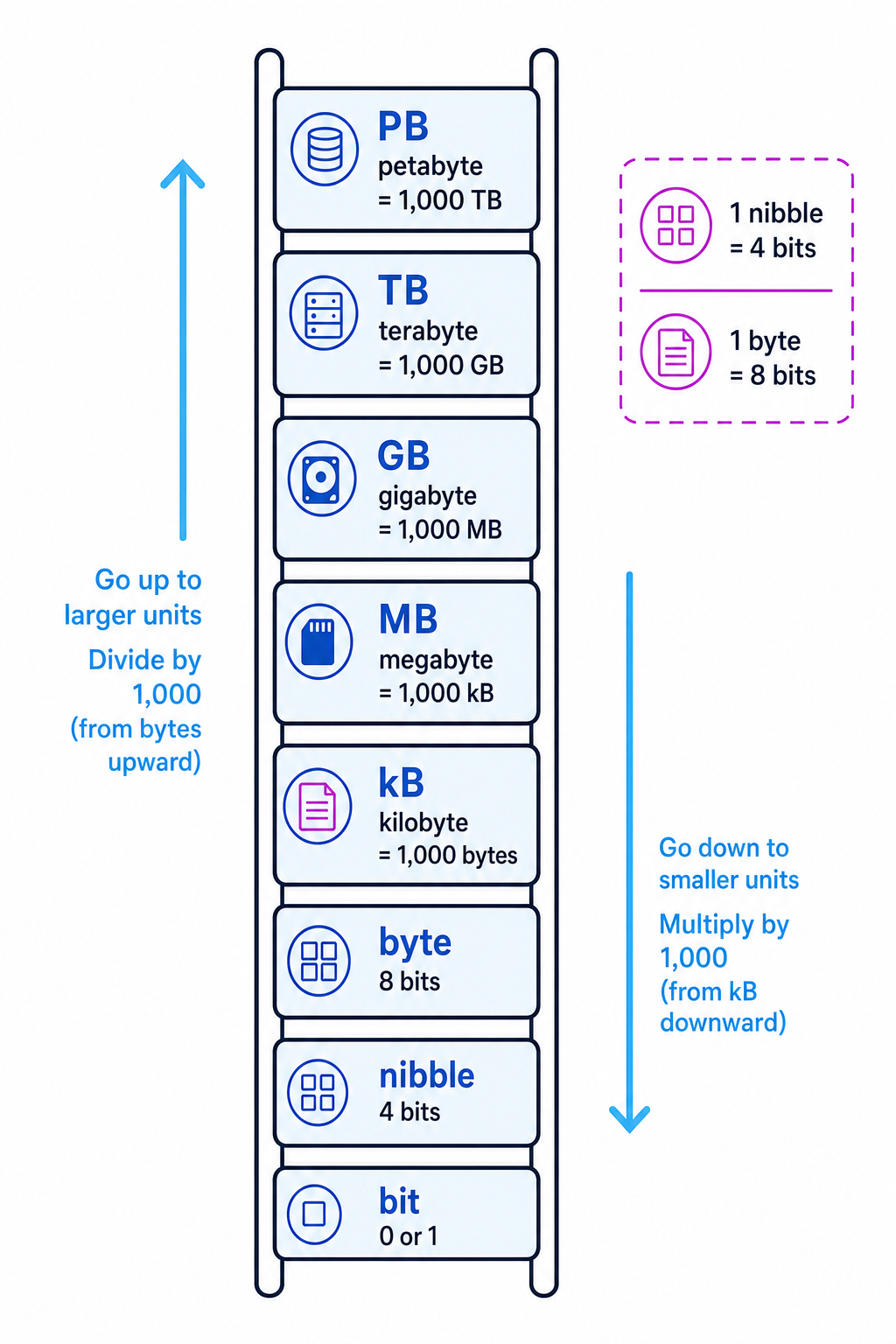
The ladder below shows the storage units from smallest to largest, and the direction for multiplying or dividing when converting.
Common Mistake
Bits and bytes are not the same
A bit is one binary digit. A byte is 8 bits. If a file size formula gives an answer in bits, you must divide by 8 to convert it into bytes.
Common Mistake
1,000 or 1,024?
For OCR J277, use decimal prefixes unless told otherwise: 1 kB = 1,000 bytes, 1 MB = 1,000 kB, and so on. Using 1,024 is also accepted, especially if the question states it.
Converting between units
When moving from a larger unit to a smaller unit, multiply.
For example:
- GB to MB: multiply by 1,000
- MB to kB: multiply by 1,000
- bytes to bits: multiply by 8
When moving from a smaller unit to a larger unit, divide.
For example:
- MB to GB: divide by 1,000
- kB to MB: divide by 1,000
- bits to bytes: divide by 8
Example
Converting between MB and bytes
A file is 6 MB. Convert this to bytes.
- Convert megabytes to kilobytes by multiplying by 1,000: 6 MB=6,000 kB6\text{ MB} = 6{,}000\text{ kB}6 MB=6,000 kB.
- Convert kilobytes to bytes by multiplying by 1,000 again: 6,000 kB=6,000,000 bytes6{,}000\text{ kB} = 6{,}000{,}000\text{ bytes}6,000 kB=6,000,000 bytes.
- So 6 MB is 6,000,000 bytes.
Tip
Convert one step at a time
If you are unsure, write out the unit ladder first. Move one step at a time and multiply or divide at each step.
Capacity and file size
File size means how much storage a file needs.
Capacity means the maximum amount of data a storage device can hold. Storage devices have different fixed capacities, such as:
- 32 GB USB flash drive
- 256 GB solid-state drive
- 1 TB hard disk drive
A device cannot store more data than its capacity. If the total file sizes are larger than the device capacity, the files will not all fit.
Definition
Storage capacity
Storage capacity is the maximum amount of data that can be stored on a device or storage medium.
When calculating whether files will fit, convert everything into the same unit first.
Example
Checking whether files fit
A student has a 4 GB USB drive. They want to store:
- 1.5 GB of video files
- 900 MB of image files
- 700 MB of documents
Will the files fit?
- Convert the USB drive capacity into MB: 4 GB=4,000 MB4\text{ GB} = 4{,}000\text{ MB}4 GB=4,000 MB.
- Convert all file sizes into MB. The videos are 1.5 GB=1,500 MB1.5\text{ GB} = 1{,}500\text{ MB}1.5 GB=1,500 MB.
- Add the file sizes: 1,500+900+700=3,100 MB1{,}500 + 900 + 700 = 3{,}100\text{ MB}1,500+900+700=3,100 MB.
- Compare the total with the capacity: 3,100 MB is less than 4,000 MB, so the files will fit.
Calculating text file size
A text file stores characters, such as letters, numbers, spaces and punctuation marks. Each character is stored using a fixed number of bits, depending on the character set being used.
Definition
Character
A character is a single symbol in text, such as A, 7, ?, or a space.
Use this formula:
text size (bits)=bits per character×number of characters\text{text size (bits)} = \text{bits per character} \times \text{number of characters}text size (bits)=bits per character×number of charactersThen convert bits into bytes by dividing by 8.
Example
Calculating text file size
A text file contains 2,000 characters. Each character uses 8 bits. Calculate the file size in bytes.
- Substitute into the text file formula: text size=8×2,000\text{text size} = 8 \times 2{,}000text size=8×2,000 bits.
- Calculate the size in bits: 8×2,000=16,000 bits8 \times 2{,}000 = 16{,}000\text{ bits}8×2,000=16,000 bits.
- Convert bits to bytes by dividing by 8: 16,000÷8=2,000 bytes16{,}000 \div 8 = 2{,}000\text{ bytes}16,000÷8=2,000 bytes.
Calculating image file size
A digital image is made from pixels, which are tiny squares of colour. The number of pixels is found from the image width and height.
Definition
Colour depth
Colour depth is the number of bits used to store the colour of each pixel in an image.
Use this formula:
image size (bits)=colour depth×height (px)×width (px)\text{image size (bits)} = \text{colour depth} \times \text{height (px)} \times \text{width (px)}image size (bits)=colour depth×height (px)×width (px)Then divide by 8 to convert from bits to bytes.
Example
Calculating image file size
An image is 800 pixels wide and 600 pixels high. It has a colour depth of 24 bits. Calculate the file size in MB.
- Substitute into the image formula: image size=24×600×800\text{image size} = 24 \times 600 \times 800image size=24×600×800 bits.
- Calculate the number of bits: 24×600×800=11,520,000 bits24 \times 600 \times 800 = 11{,}520{,}000\text{ bits}24×600×800=11,520,000 bits.
- Convert bits to bytes: 11,520,000÷8=1,440,000 bytes11{,}520{,}000 \div 8 = 1{,}440{,}000\text{ bytes}11,520,000÷8=1,440,000 bytes.
- Convert bytes to MB: 1,440,000÷1,000÷1,000=1.44 MB1{,}440{,}000 \div 1{,}000 \div 1{,}000 = 1.44\text{ MB}1,440,000÷1,000÷1,000=1.44 MB.
Calculating sound file size
A digital sound file is made by taking measurements of a sound wave many times per second.
Definition
Sample rate
Sample rate is the number of sound samples taken per second. It is usually measured in hertz, Hz.
Definition
Bit depth
Bit depth is the number of bits used to store each sound sample.
Use this formula:
sound size (bits)=sample rate×duration (s)×bit depth\text{sound size (bits)} = \text{sample rate} \times \text{duration (s)} \times \text{bit depth}sound size (bits)=sample rate×duration (s)×bit depthThen divide by 8 to convert from bits to bytes.
Example
Calculating sound file size
A sound file has a sample rate of 8,000 Hz, lasts for 30 seconds, and uses a bit depth of 16 bits. Calculate the file size in kB.
- Substitute into the sound formula: sound size=8,000×30×16\text{sound size} = 8{,}000 \times 30 \times 16sound size=8,000×30×16 bits.
- Calculate the number of bits: 8,000×30×16=3,840,000 bits8{,}000 \times 30 \times 16 = 3{,}840{,}000\text{ bits}8,000×30×16=3,840,000 bits.
- Convert bits to bytes: 3,840,000÷8=480,000 bytes3{,}840{,}000 \div 8 = 480{,}000\text{ bytes}3,840,000÷8=480,000 bytes.
- Convert bytes to kB: 480,000÷1,000=480 kB480{,}000 \div 1{,}000 = 480\text{ kB}480,000÷1,000=480 kB.
Metadata and real file sizes
The formulas above calculate the main data in the file. Real files may also contain metadata, which is extra data about the file.
For example, an image file might store metadata about:
- image dimensions
- date created
- camera settings
- file type
In GCSE calculations, you normally ignore metadata unless the question tells you to include it.
Key Idea
Use the formula the question needs
Text, image and sound files use different file-size formulas. Always choose the formula that matches the type of data.
Exam technique
In the exam
- Convert all values into matching units before comparing capacities or adding file sizes.
- If a formula gives an answer in bits, divide by 8 to get bytes before converting to kB, MB or GB.
- Use 1,000 for kB, MB, GB, TB and PB conversions unless the question states 1,024.
Self review
Check yourself
- Why must data be converted into binary before a computer can process it?
- How many bits are in a nibble, and how many bits are in a byte?
- Which formula would you use to calculate the size of an uncompressed sound file?

Recap questions
Test yourself with 5 quick questions on this guide. Answer them all correctly to complete it.
You've reached the end
Test yourself on this topic, or move on to the next guide.
How was this guide?