Revision notes for Edexcel GCSE Computer Science Input/output. Open each subtopic for explanations, worked examples, and summaries of Accepting and responding to user input, Reading and writing CSV text files, Implementing validation, and Implementing authentication. Written against the Edexcel GCSE Computer Science (1CP2) specification, so the content matches what's examinable rather than general Computer Science background.
Input/output
Programs need to interact with the real world to be of any practical use. If a program cannot receive data or show you its results, it is essentially running in a vacuum.
In this guide, we will explore how computer programs receive data from the keyboard and display results back to a user on the screen.
What you'll learn
- How to capture and store user input from the keyboard.
- How to display text and variable values as output on the computer screen.
- How to handle data types correctly when converting inputs for calculations.
The Input-Process-Output Model
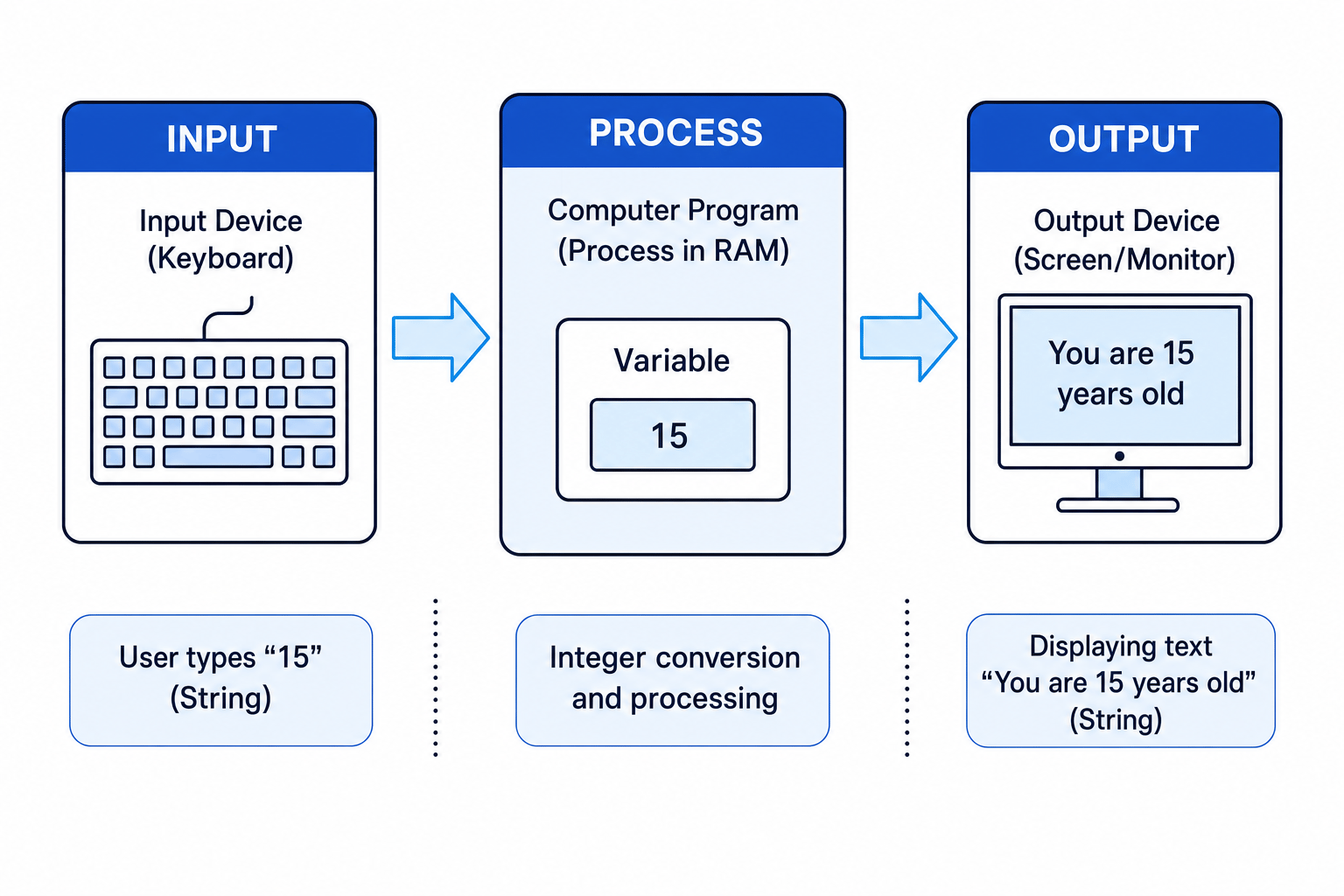
At its core, almost every program you write follows the Input-Process-Output (IPO) model.
Definition
Input
Input is any data that is sent from the outside world into a computer system or program. Typical input devices include keyboards, mice, sensors, and microphones.
Definition
Output
Output is any data or information that is sent out from a computer program to a user or another device. Typical output devices include monitors (displays), speakers, and printers.
Between the input and the output sits the Process. This is where your CPU executes instructions, performs calculations, and manipulates variables stored in RAM.
Obtaining Keyboard Input
To get information from a user, we must instruct the program to pause and wait for the user to type something on the keyboard and press the Enter key.
Input in AQA Pseudo-code
In AQA pseudo-code, we use the keyword USERINPUT to read a value from the keyboard. We must assign this input directly to a variable using the assignment operator (←) so that the program remembers it.
username ← USERINPUT
Input in Python 3
In Python, we use the input() function. We can also pass a prompt message inside the parentheses to tell the user what we expect them to type.
username = input("Please enter your name: ")
When this line runs:
- The message
"Please enter your name: "is displayed on the screen. - The program pauses execution.
- The user types their name and presses Enter.
- Whatever they typed is saved into the variable
usernameas a string (text).
Common Mistake
All inputs start as strings
Whenever you use USERINPUT in pseudo-code or input() in Python, the computer stores the entered data as a String (text) data type. Even if the user types a number like 15, the computer sees it as the text characters "1" and "5", not the numerical value 151515.
Displaying Program Output
To show information, messages, or calculation results back to the user, we send data to the computer's display screen.
Output in AQA Pseudo-code
In pseudo-code, we use the OUTPUT keyword. We can output literal text (enclosed in speech marks), the contents of variables, or a combination of both.
OUTPUT 'Hello'
OUTPUT username
To join (concatenate) multiple items together on one line, we can comma-separate them or use the concatenation operator (+).
OUTPUT 'Hello ' + username
Output in Python 3
In Python, we use the built-in print() function.
print("Hello " + username)
Data Type Casting with Inputs
Because keyboard inputs always arrive as strings, we cannot immediately perform mathematical operations on them.
If you try to multiply the string "5" by 222, the computer will either produce an error or write "55" (concatenation) instead of calculating 101010. To fix this, we must perform type casting.
Definition
Type Casting
Type casting is the process of converting a value from one data type to another (for example, converting the string "23" into the integer 23).
Casting Functions
- To Integer: Converts a string to a whole number.
- Pseudo-code:
STRING_TO_INT("25") - Python:
int("25")
- Pseudo-code:
- To Real / Float: Converts a string to a decimal number.
- Pseudo-code:
STRING_TO_REAL("19.99") - Python:
float("19.99")
- Pseudo-code:
Example
Processing and formatting age calculation
A program needs to ask a user for the year they were born, calculate their approximate age based on the current year (2025), and output a polite message. Let's walk through how to construct this algorithm safely.
-
Obtain the user's birth year as input: We call the input function and store the result in a variable called
birth_year_str.birth_year_str ← USERINPUT -
Convert the string input into an integer: We cast the string representation to an integer so we can perform subtraction.
birth_year_int ← STRING_TO_INT(birth_year_str) -
Calculate the age: Subtract the integer birth year from the current year (202520252025).
age ← 2025 - birth_year_int
- Construct and output the final response message:
Combine a text literal with the calculated age (which may need casting back to a string to concatenate cleanly depending on the strictness of the language environment).
OUTPUT 'You will turn ' + INT_TO_STRING(age) + ' years old in 2025.'
Common Pitfalls & Exam Strategy
Common Mistake
Forgetting to convert input data types
Students often try to do calculations directly on inputs without casting first.
For example, writing result ← USERINPUT * 2 is a logical error because USERINPUT is a string. If the user entered 4, the computer might crash or produce '44', not 8. Always cast numeric inputs!
Tip
Match your quotes
Whenever you write output strings, make sure your quotation marks match up. If you start a string literal with a single quote ', you must close it with a single quote '. Mixing them up (e.g., 'Hello") will cause a syntax error.
Exam technique
In the exam
- Read the output format requirements carefully: If the question asks for the exact output "Your score is: 10", do not output just "10" or "Score: 10". You will lose marks for incorrect string formatting.
- Handle user-friendly prompts: If asked to write code to get an input, check if the question specifies showing a prompt. Write
print("Enter value: ")followed by the input, or combine them likeinput("Enter value: "). - Use pseudo-code keywords correctly: AQA exams accept standard programming languages (like Python) OR AQA pseudo-code. If you choose pseudo-code, stick to uppercase
USERINPUTandOUTPUT.
Self review
Check yourself
- Why is it impossible to immediately double a number that a user has entered via
USERINPUTwithout using another function first? - Write a line of AQA pseudo-code that asks a user for their favorite color and stores it in an appropriately named variable.
- What is the difference between an input device and an output device in the context of computer hardware?

Recap questions
Test yourself with 20 quick questions on this guide. Answer them all correctly to complete it.
You've reached the end
Test yourself on this topic, or move on to the next guide.
How was this guide?