Revision notes for Edexcel GCSE Computer Science Global and local variables. Open the guide for explanations and worked examples. Written against the Edexcel GCSE Computer Science (1CP2) specification, so the content matches what's examinable rather than general Computer Science background.
Global and local variables
What you'll learn
- What global variables and local variables are.
- How scope affects where a variable can be used.
- How to trace programs that use variables inside and outside subprograms.
- How to write Python 3 programs that use globals, locals, parameters, and return values sensibly.
Before you start: variables and subprograms
Variables
A program often needs to store values while it runs, such as a score, a username, or a total.
Definition
Variable
A variable is a named storage location in a program. It stores a value that can be read and changed while the program runs.
For example, in Python:
score = 0
player_name = "Asha"
The variable names are score and player_name. The values are 0 and "Asha".
Subprograms
You have met subprograms in the parent topic. A subprogram lets you group code for a particular task, then run it when needed.
Definition
Subprogram
A subprogram is a named block of code that performs a task. In Python, this is usually written as a function using def.
For example:
def greet_player():
    print("Welcome!")

greet_player()
The line def greet_player(): defines the subprogram. The line greet_player() calls it, which means “run this subprogram now”.
Scope: where a variable can be used
The key idea in this topic is scope.
Definition
Scope
Scope is the part of a program where a variable name can be used.
A variable might be available throughout the whole program, or only inside one subprogram. This affects whether your program runs correctly, and whether it is easy to understand and maintain.
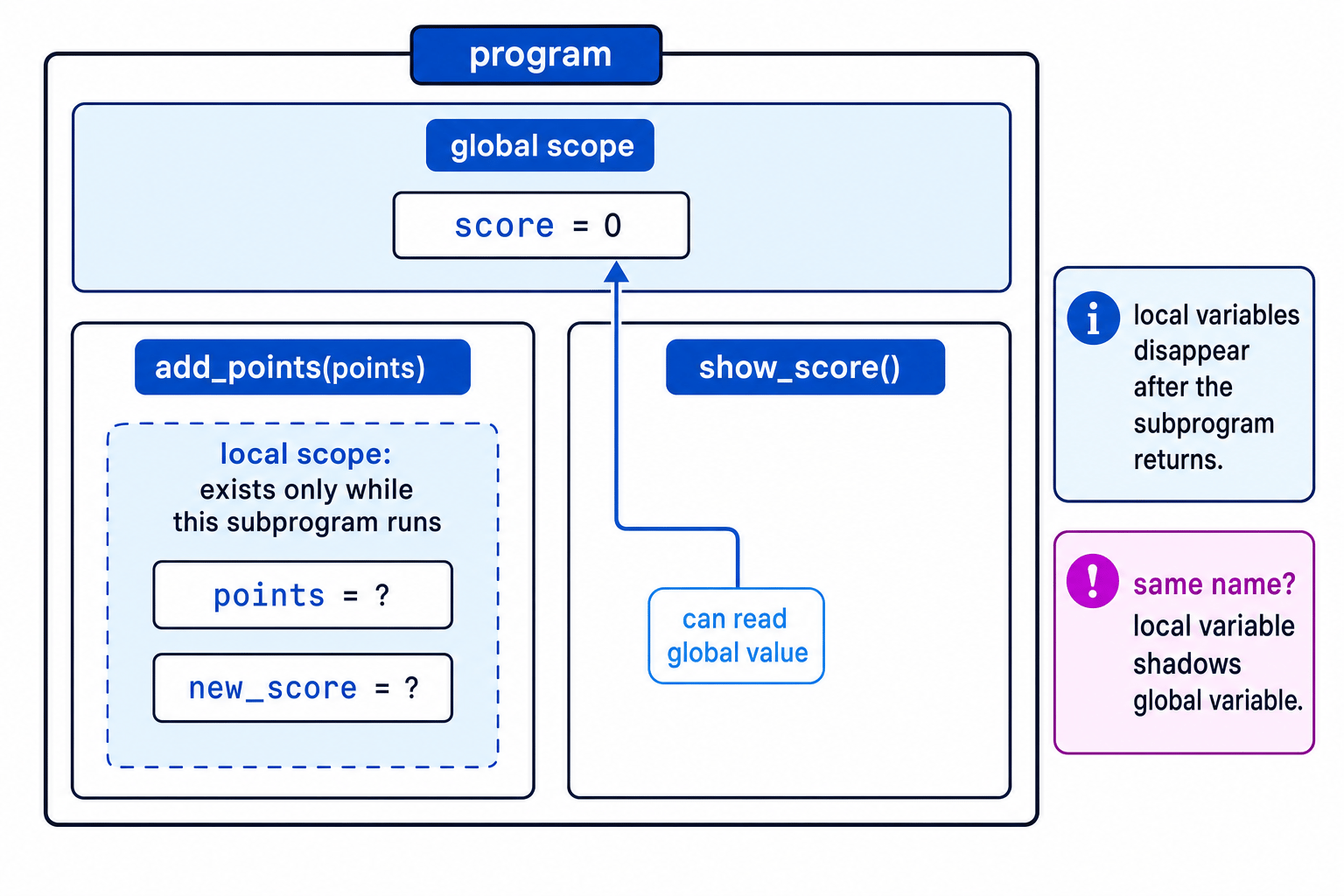
Key Idea
Scope controls visibility
A variable can only be used in the part of the program where it is in scope. If it is out of scope, that part of the program cannot access it directly.
Lifetime: how long a variable exists
Another useful idea is lifetime.
Definition
Lifetime
A variable’s lifetime is how long it exists while the program is running.
For GCSE, keep this simple:
- A global variable usually exists for the whole time the program is running.
- A local variable exists only while its subprogram is running.
Global variables
A global variable is created outside any subprogram.
Definition
Global variable
A global variable is a variable declared outside subprograms, so it belongs to the main program scope.
Example:
score = 0

def show_score():
    print(score)

show_score()
Here, score is global because it is assigned outside show_score().
In Python, a subprogram can usually read a global variable, as long as it does not try to assign a new value to the same name inside the subprogram.
Example
Tracing a global variable read
message = "Hello"

def print_message():
    print(message)

message = "Good luck"
print_message()
- The first assignment creates a global variable called
messageand stores"Hello". - The subprogram
print_message()is defined, but its code does not run yet. - The assignment
message = "Good luck"changes the global value before the subprogram is called. - When
print_message()runs, it reads the current global value ofmessage, so the output isGood luck.
Local variables
A local variable is created inside a subprogram.
Definition
Local variable
A local variable is a variable declared inside a subprogram. It can only be used inside that subprogram.
Example:
def calculate_total(price):
    vat = price * 0.20
    total = price + vat
    return total

amount_to_pay = calculate_total(50)
print(amount_to_pay)
In this program:
priceis a parameter, which is a variable that receives a value passed into a subprogram.vatandtotalare local variables.amount_to_payis global because it is created outside the subprogram.
Definition
Parameter
A parameter is a local variable in a subprogram heading that receives an input value when the subprogram is called.
Example
Tracing local variables and a return value
def calculate_total(price):
    vat = price * 0.20
    total = price + vat
    return total

amount_to_pay = calculate_total(50)
print(amount_to_pay)
- The argument
50is passed into the subprogram, so the local parameterpricestores50. - Inside the subprogram,
vatis calculated as10.0, thentotalis calculated as60.0. - The statement
return totalsends60.0back to the main program. - After the subprogram finishes, the local variables
price,vat, andtotaldisappear. The global variableamount_to_paystores the returned value.
Common Mistake
Trying to use a local variable outside its subprogram
If you tried to write print(vat) after the subprogram call, Python would give an error because vat is local to calculate_total().
Global vs local: quick comparison
| Feature | Global variable | Local variable |
|---|---|---|
| Where created | Outside subprograms | Inside a subprogram |
| Where usable | In the main program, and often readable inside subprograms | Only inside its own subprogram |
| Lifetime | Usually whole program run | Only while the subprogram runs |
| Good use | Shared program state or constants | Temporary working values inside a task |
| Risk | Can be changed accidentally from different places | Safer and easier to reason about |
Same name, different scopes
A local variable can have the same name as a global variable. This is allowed, but it can be confusing.
In Python, if you assign to a variable name inside a function, Python treats that name as local unless you explicitly say otherwise.
Definition
Shadowing
Shadowing happens when a local variable has the same name as a global variable, so the local variable is used inside the subprogram instead of the global one.
Example
Predicting output when names match
level = 1

def start_level():
    level = 2
    print(level)

start_level()
print(level)
- Before the subprogram call, the global variable
levelstores1. - Inside
start_level(), the assignmentlevel = 2creates a separate local variable calledlevel. - The first
print(level)is inside the subprogram, so it uses the local value and outputs2. - After the subprogram finishes, the local
leveldisappears. The globallevelis still1, so the second output is1.
Common Mistake
Assuming a local assignment changes the global variable
If a subprogram assigns to a variable with the same name as a global variable, it has usually created a new local variable. It has not automatically changed the global one.
Changing a global variable in Python
Sometimes you may genuinely need a subprogram to change a global variable. In Python, you must use the keyword global inside the subprogram before assigning to that variable.
high_score = 0

def update_high_score(new_score):
    global high_score
    if new_score > high_score:
        high_score = new_score

update_high_score(12)
print(high_score)
Here, high_score is global. The subprogram uses global high_score so that high_score = new_score changes the global variable rather than creating a local one.
Common Mistake
Use global carefully
Using global can make programs harder to test and debug because many subprograms might change the same value. Use it only when the value really belongs to the whole program.
Appropriate use in programs
For Edexcel 1CP2, you need to understand the difference and be able to write programs that use global and local variables appropriately.
Prefer local variables for temporary work
If a value is only needed while one subprogram is doing its job, make it local.
Good examples of local variables:
totalinside a subprogram that calculates a totalaverageinside a subprogram that calculates an averagevalidinside a subprogram that checks an input
Local variables make your code safer because other parts of the program cannot accidentally change them.
Use parameters to pass data in
Do not make everything global just so a subprogram can access it. Pass values in as parameters.
def calculate_area(width, height):
    area = width * height
    return area

room_area = calculate_area(6, 4)
print(room_area)
Here, width and height are parameters. area is local. room_area is global because it is in the main program.
Example
Choosing parameters, locals, and a return value
Task: write a subprogram to calculate the area of a rectangle.
- The width and height are inputs to the subprogram, so they should be parameters:
widthandheight. - The calculated area is only needed while the calculation is being done, so
areacan be a local variable. - The main program needs the answer, so the subprogram should
return area. - No global variable is needed because the calculation is self-contained.
Use return values to send data back
A subprogram should usually send results back using return, rather than directly changing global variables.
def add_numbers(first_number, second_number):
    total = first_number + second_number
    return total

answer = add_numbers(7, 5)
print(answer)
This is clear because:
- the inputs are obvious:
first_number,second_number - the temporary working value is local:
total - the output is returned and stored in
answer
Use global variables only when they are genuinely shared
A global variable can be appropriate when the value belongs to the whole program.
Possible examples:
- a game score that is displayed and updated in several parts of the program
- a high score stored for the whole game
- a setting used by many subprograms
- a constant value, such as
MAX_ATTEMPTS
Definition
Constant
A constant is a named value that is intended not to change while the program runs. In Python, programmers often write constant names in capital letters, such as MAX_ATTEMPTS.
Example using a global constant:
MAX_ATTEMPTS = 3

def password_allowed(attempts):
    return attempts < MAX_ATTEMPTS

print(password_allowed(2))
MAX_ATTEMPTS is global, but it is not being changed. This is usually safer than having many subprograms change the same global variable.
Tip
A simple decision rule
If a value is only needed inside one subprogram, make it local. If a subprogram needs an input, use a parameter. If it produces an answer, use return. Only use a global variable when the value genuinely belongs to the whole program.
Writing cleaner programs
Compare these two approaches.
Less good: using a global variable for a temporary result.
total = 0

def add_numbers(first_number, second_number):
    global total
    total = first_number + second_number

add_numbers(4, 9)
print(total)
Better: returning the result.
def add_numbers(first_number, second_number):
    total = first_number + second_number
    return total

answer = add_numbers(4, 9)
print(answer)
The second version is usually better because the subprogram is independent. It takes inputs, works out an answer, and returns it. It does not rely on changing a shared global variable.
Key Idea
Best GCSE habit
Most subprograms should use parameters for inputs, local variables for temporary work, and return values for outputs.
Pitfalls to watch for
Pitfall 1: thinking every variable is available everywhere
Variables are not automatically available in all parts of a program. A local variable belongs to one subprogram.
Pitfall 2: using globals when parameters would be clearer
If a subprogram needs a value, it is usually clearer to pass that value in as a parameter.
Pitfall 3: changing globals from lots of places
If many subprograms change the same global variable, it can become difficult to find where a wrong value came from.
Exam technique
In the exam
- When tracing code, mark whether each variable is global or local before predicting outputs.
- If a variable is created inside a subprogram, do not use it outside that subprogram unless it has been returned.
- When writing code, prefer parameters and return values; use a global variable only when the value is genuinely shared across the whole program.
Self review
Check yourself
- What is the difference between a global variable and a local variable?
- Why is it usually better to pass a value as a parameter than to rely on a global variable?
- What will happen if a function creates a local variable with the same name as a global variable?
You've reached the end
Test yourself on this topic, or move on to the next guide.
How was this guide?