Revision notes for Edexcel GCSE Computer Science Binary representation and number of states. Open the guide for explanations and worked examples. Written against the Edexcel GCSE Computer Science (1CP2) specification, so the content matches what's examinable rather than general Computer Science background.
Binary representation and number of states
What you'll learn
- Why computers represent data and program instructions using binary.
- What a bit, binary pattern, and state are.
- How to calculate the maximum number of states from a given number of bits.
- Why 8 bits can represent 256 states, but unsigned values from 0 to 255.
Why computers use binary
Computers are electronic machines. Inside their circuits, it is easiest and most reliable to distinguish between two conditions, such as off/on, low voltage/high voltage, or false/true.
Those two conditions are represented using binary, which uses only the digits 0 and 1.
Definition
Binary
Binary is a base-2 number system that uses only two digits: 0 and 1. Each binary digit is called a bit.
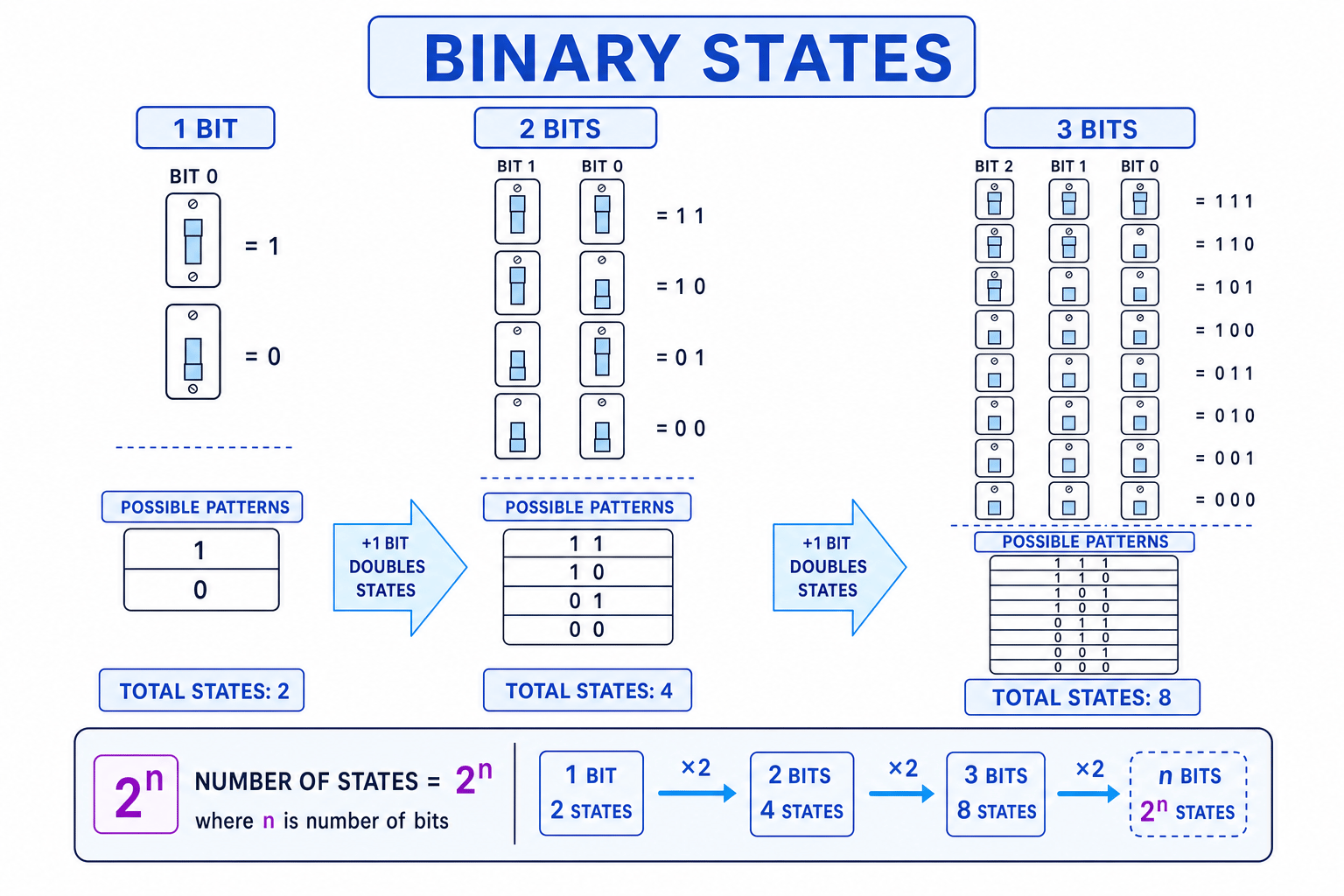
A single bit can store one of two possible values: 0 or 1. You can think of this like a switch that can be off or on.
Key Idea
Everything becomes bits
A computer represents numbers, text, sound, graphics, and program instructions as patterns of bits. The same binary pattern can mean different things depending on how the computer has been told to interpret it.
Data and instructions are both represented in binary
A common misconception is that binary is only used for numbers. In reality, a computer stores and processes all information as binary patterns.
Numbers
Numbers can be represented directly using binary place values. For example, an 8-bit unsigned binary number can represent denary values from 0 to 255.
Definition
Denary
Denary is the base-10 number system you normally use in everyday life. It uses the digits 0 to 9.
Text
Text is represented using a character set, which is an agreed list that matches characters to binary codes. For example, a character such as A is stored using a binary pattern, not as the drawn shape of the letter.
Definition
Character set
A character set is a system that assigns characters, such as letters, digits, punctuation marks, and symbols, to numeric codes that can be stored in binary.
Sound
Sound is represented by taking measurements of a sound wave. Each measurement is called a sample, and each sample is stored as a binary number.
Graphics
A bitmap image is made of tiny squares called pixels. Each pixel’s colour is represented by a binary pattern. More bits per pixel means more possible colour states.
Program instructions
Program instructions are also stored in binary. The CPU does not understand English commands like “add these numbers”; instead, it processes coded binary patterns that represent instructions such as add, compare, store, or jump.
Binary patterns
A binary pattern is a sequence of bits. The length of the pattern is the number of bits it contains.
For example:
0is a 1-bit pattern.10is a 2-bit pattern.1011is a 4-bit pattern.0100 0001is an 8-bit pattern.
When writing 8-bit binary, it is helpful to group the bits into two groups of 4. A group of 4 bits is called a nibble, and a group of 8 bits is called a byte.
Definition
State
A state is one distinct possibility that a binary pattern can represent. For example, a 1-bit pattern has two possible states: 0 and 1.
The number of states formula
Each bit has two possible values: 0 or 1.
So if you have more than one bit, the number of possible patterns multiplies by 2 for each extra bit.
The formula is:
number of states=2n\text{number of states} = 2^nnumber of states=2nwhere nnn is the number of bits in the binary pattern.
Key Idea
Each extra bit doubles the states
Adding one extra bit doubles the number of possible binary patterns, because the new bit can be either 0 or 1 for every pattern that already existed.
Example
Counting states in a 5-bit pattern
- The pattern length is 5 bits, so use n=5n = 5n=5.
- Apply the formula: number of states=25\text{number of states} = 2^5number of states=25.
- Calculate by repeated doubling: 2, 4, 8, 16, 32.
- A 5-bit binary pattern can represent 32 different states.
Useful powers of 2
You will often need to calculate powers of 2 quickly, especially because Paper 1 does not allow a calculator.
Useful values to remember:
- 1 bit gives 2 states.
- 2 bits give 4 states.
- 3 bits give 8 states.
- 4 bits give 16 states.
- 5 bits give 32 states.
- 6 bits give 64 states.
- 7 bits give 128 states.
- 8 bits give 256 states.
Tip
Quick doubling method
Start at 1 and double once for each bit: 1 → 2 → 4 → 8 → 16 → 32 → 64 → 128 → 256.
Example
Finding the states for an 8-bit pattern
- The pattern contains 8 bits, so use n=8n = 8n=8.
- Substitute into the formula: number of states=28\text{number of states} = 2^8number of states=28.
- Double eight times: 1, 2, 4, 8, 16, 32, 64, 128, 256.
- Therefore, an 8-bit pattern can represent 256 different states.
States are not always the same as the largest value
This is very important for GCSE questions.
An 8-bit pattern has 256 possible states, but if those states are being used to represent unsigned whole numbers, the values run from 0 to 255.
That is still 256 values in total, because 0 counts as one of the values.
The highest unsigned value is:
highest unsigned value=2n−1\text{highest unsigned value} = 2^n - 1highest unsigned value=2n−1Common Mistake
Forgetting that counting starts at 0
Do not say that 8 bits represent values 1 to 256. For unsigned 8-bit integers, the range is 0 to 255. There are 256 possible states, but the largest value is 255.
Example
Comparing states and largest unsigned value
- For 8 bits, calculate the number of states: 28=2562^8 = 25628=256.
- If those states represent unsigned denary integers, the first value is 0.
- Because 0 uses one state, the final value is one less than the number of states: 256−1=255256 - 1 = 255256−1=255.
- So 8 bits can represent 256 states, or unsigned denary values from 0 to 255.
Applying states to real data
The formula works for any situation where binary patterns are being used to represent possibilities.
For example, if a pixel uses 3 bits for its colour, then each pixel can have a maximum of 8 colour states. The computer does not care whether those states are numbers, colours, letters, or instructions — they are still binary patterns.
Example
Calculating possible pixel colours
- The pixel colour is stored using 3 bits, so use n=3n = 3n=3.
- Apply the states formula: number of states=23\text{number of states} = 2^3number of states=23.
- Calculate the result: 23=82^3 = 823=8.
- Therefore, each pixel can represent a maximum of 8 different colours.
Common Mistake
Maximum states may not all be used
The formula gives the maximum number of states. A system might reserve some binary patterns for special meanings, so not every possible pattern must be used in practice.
Different meanings from the same bits
The same binary pattern can be interpreted in different ways depending on context.
For example, 0100 0001 could be treated as:
- an unsigned binary number,
- a character code in a character set,
- part of a pixel colour,
- part of a sound sample,
- part of a program instruction.
The bits themselves do not “know” what they mean. The software and hardware decide how to interpret the pattern.
Key Idea
Representation depends on interpretation
Binary patterns are just sequences of 0s and 1s. Their meaning comes from the agreed representation system being used.
Summary
Computers use binary because two-state electronic signals are reliable to store and process. A bit is one binary digit, and a binary pattern is a sequence of bits.
The maximum number of states for a binary pattern of length nnn is:
2n2^n2nFor GCSE, remember that 8 bits give 256 states. If those states are used for unsigned whole numbers, the range is 0 to 255.
Exam technique
In the exam
- Identify the number of bits in the pattern, then use 2n2^n2n to find the maximum number of states.
- Use repeated doubling if you cannot use a calculator: 2, 4, 8, 16, 32, 64, 128, 256.
- Keep states separate from largest unsigned value: 8 bits give 256 states, but unsigned values 0 to 255.
Self review
Check yourself
- How many states can be represented by a 6-bit binary pattern?
- Why does an 8-bit unsigned integer have a maximum value of 255, not 256?
- Give three types of data, other than numbers, that computers represent using binary.
You've reached the end
Test yourself on this topic, or move on to the next guide.
How was this guide?