Revision notes for Edexcel GCSE Computer Science Binary addition and binary shifts. Open the guide for explanations and worked examples. Written against the Edexcel GCSE Computer Science (1CP2) specification, so the content matches what's examinable rather than general Computer Science background.
Binary addition and binary shifts
What you'll learn
- How to add two positive 8-bit binary patterns using carries.
- How to recognise overflow when a result does not fit into 8 bits.
- How logical shifts move bits and relate to multiplying or dividing by powers of 2.
- How arithmetic shifts work with signed two's-complement values.
Before you start: 8-bit binary patterns
A bit is a binary digit: either 0 or 1. In GCSE questions, you will often work with an 8-bit pattern, such as 0011 0101. We usually group the bits into two nibbles of 4 bits to make them easier to read.
For an unsigned 8-bit integer, all bits represent positive place values:
| Bit position | 128 | 64 | 32 | 16 | 8 | 4 | 2 | 1 |
|---|
So unsigned 8-bit values can represent 0 to 255.
Definition
Unsigned integer
An unsigned integer is a whole number with no sign bit. In 8 bits, every bit contributes a positive place value, so the range is 0 to 255.
Example
Finding the value of an 8-bit pattern
Find the unsigned denary value of 0010 1101.
- Match the 1 bits to their place values: 0010 1101 has 1s in the 32, 8, 4 and 1 columns.
- Add those place values: 32+8+4+1=4532 + 8 + 4 + 1 = 4532+8+4+1=45.
- Therefore, 0010 1101 represents denary 45 as an unsigned 8-bit integer.
Binary addition
Binary addition works like denary column addition, but each column can only contain 0 or 1. If a column adds up to 2 or 3, you write one bit in the answer and carry the extra value into the next column on the left.
Definition
Carry
A carry is a value passed into the next column during addition when the current column’s total is too large to fit in one bit.
The key rules are:
- 0 + 0 = 0
- 0 + 1 = 1
- 1 + 1 = 10, so write 0 and carry 1
- 1 + 1 + 1 = 11, so write 1 and carry 1
This diagram shows the column method and what overflow looks like when the result is too large for 8 bits.
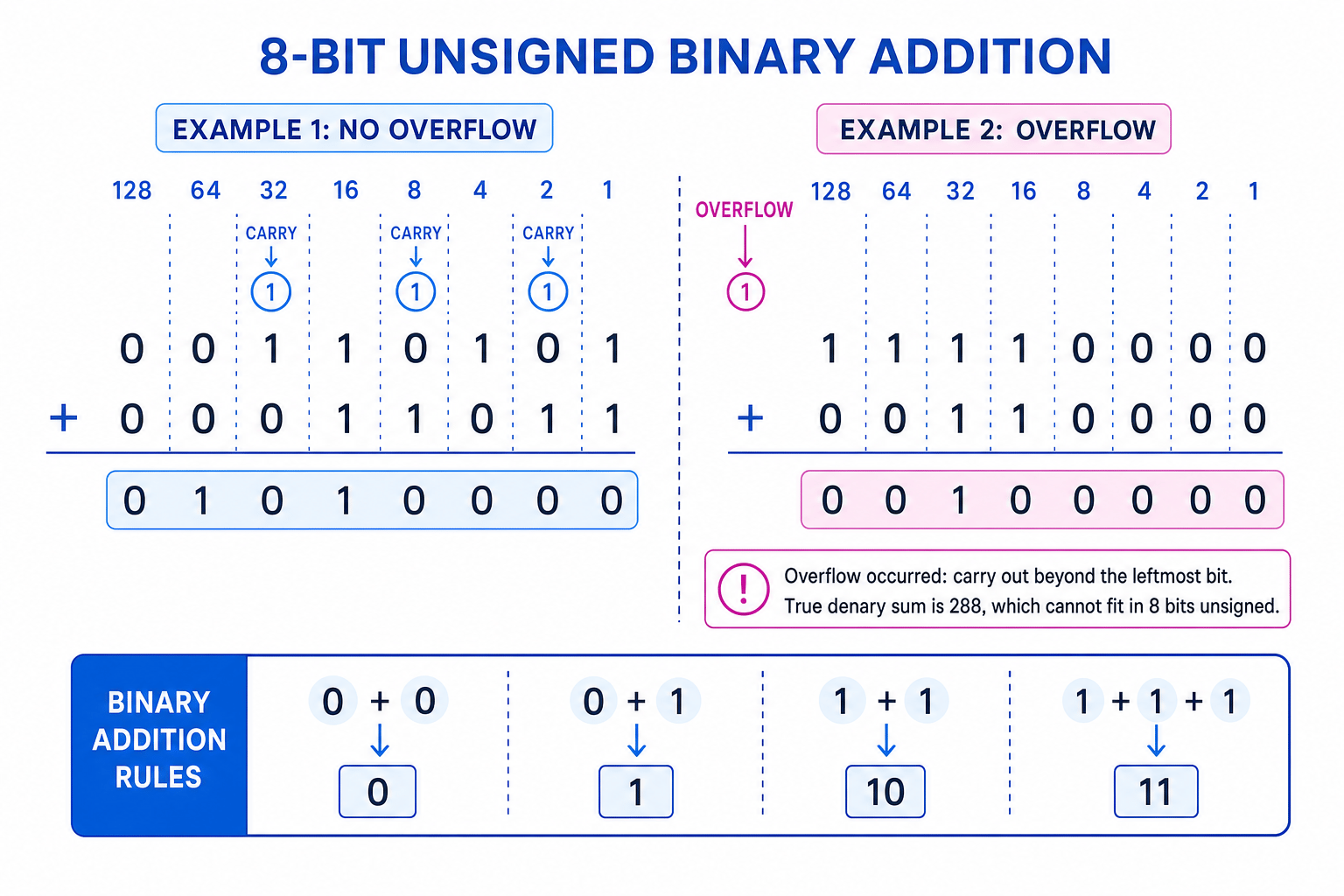
Column method for adding positive binary patterns
To add two positive binary patterns:
- Line up the bits by place value.
- Start at the right-hand side, in the 1 column.
- Add the bits in that column, plus any carry from the previous column.
- Write the result bit and carry if needed.
- Continue left until all 8 columns have been added.
Example
Adding two positive binary patterns
Add 0011 0101 and 0001 1011.
Calculation:
0011 0101
- 0001 1011
= 0101 0000
- Start from the right: in the 1 column, 1 + 1 gives binary 10, so write 0 and carry 1 into the 2 column.
- Continue through the next columns, always adding the two bits plus the carry. Several columns also produce a carry because their total is 2 or 3.
- After all 8 columns are added, the result is 0101 0000.
- As a quick check, 0011 0101 is 53 and 0001 1011 is 27. 53+27=8053 + 27 = 8053+27=80, and 0101 0000 is 80.
Overflow
Because GCSE binary questions normally use fixed-size patterns, an 8-bit answer must still fit into 8 bits.
Definition
Overflow
Overflow happens when the true result of a calculation is outside the range that can be represented using the number of bits available.
For unsigned 8-bit integers, the largest value is 255, which is 1111 1111. If adding two positive binary patterns gives a carry out beyond the leftmost bit, the true answer needs more than 8 bits.
Example
Spotting overflow
Add 1111 0000 and 0011 0000 using 8 bits.
- Check the denary size: 1111 0000 is 240 and 0011 0000 is 48, so 240+48=288240 + 48 = 288240+48=288.
- Compare with the unsigned 8-bit maximum: 288>255288 > 255288>255, so the true result cannot fit into 8 bits.
- In binary, the full result is 1 0010 0000. That leading 1 is a ninth bit, so an 8-bit register would only hold 0010 0000 and overflow has occurred.
Common Mistake
Ignoring the extra carry
If a carry goes past the leftmost bit in an 8-bit unsigned addition, do not just drop it and treat the answer as correct. That carry means overflow.
Binary shifts
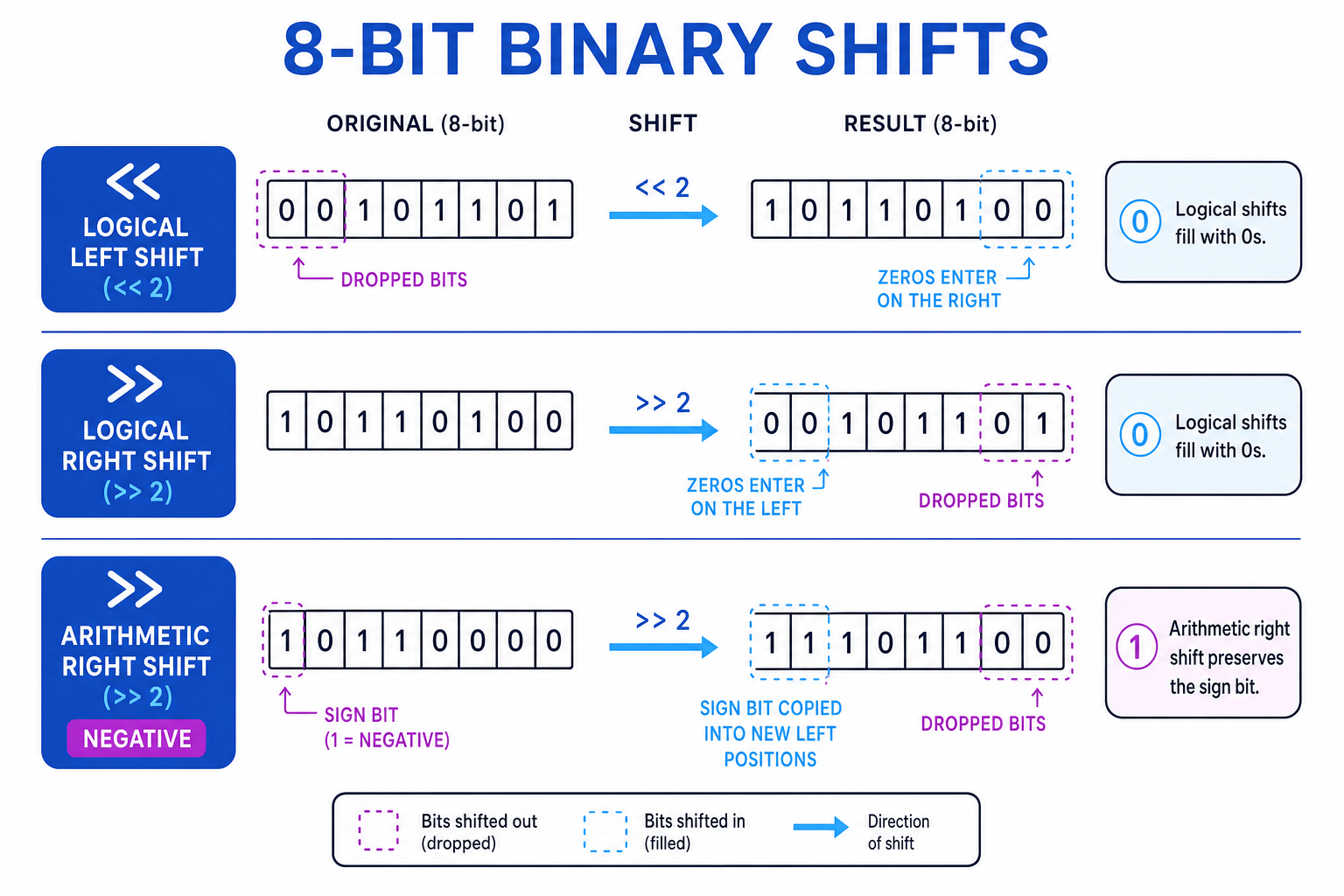
A binary shift moves every bit in a pattern left or right by a fixed number of positions. Bits shifted out of the pattern are lost. The new empty positions are filled depending on the type of shift.
Definition
Binary shift
A binary shift moves all bits in a binary pattern left or right. In GCSE, you need to apply both logical shifts and arithmetic shifts.
Logical shifts
A logical shift treats the pattern simply as bits, usually as an unsigned value. Empty positions are always filled with 0s.
Logical left shift
In a logical left shift:
- all bits move left
- bits that fall off the left are lost
- 0s enter on the right
For unsigned values, shifting left by one position usually multiplies by 2. Shifting left by n positions usually multiplies by 2n2^n2n, as long as no important 1 bits are shifted out.
Example
Applying a logical left shift
Apply a logical left shift by 2 to 0001 0110.
- Move every bit two positions to the left: 0001 0110 becomes 0101 10__ before filling the empty places.
- Fill the two empty right-hand positions with 0s, giving 0101 1000.
- Check the effect: 0001 0110 is 22, and 22×22=8822 \times 2^2 = 8822×22=88. 0101 1000 is 88, so the shift makes sense.
Logical right shift
In a logical right shift:
- all bits move right
- bits that fall off the right are lost
- 0s enter on the left
For unsigned values, shifting right by one position performs integer division by 2. Shifting right by n positions divides by 2n2^n2n, with any remainder discarded because lost bits cannot be recovered.
Example
Applying a logical right shift
Apply a logical right shift by 2 to 1011 0100.
- Move every bit two positions to the right, so the two rightmost bits are shifted out and lost.
- Fill the two empty left-hand positions with 0s, giving 0010 1101.
- Check the effect: 1011 0100 is 180, and 180÷22=45180 \div 2^2 = 45180÷22=45. 0010 1101 is 45.
Common Mistake
The shortcut has limits
The multiply/divide shortcut is a useful check, but the bit movement is the real method. A left shift can overflow if 1 bits are shifted out of the left side.
Arithmetic shifts
Arithmetic shifts are used when the bit pattern represents a signed integer, usually using two's complement.
Definition
Sign bit
In an 8-bit two's-complement integer, the sign bit is the leftmost bit. A sign bit of 0 means non-negative; a sign bit of 1 means negative. The range is −128 to +127.
Arithmetic right shift
An arithmetic right shift preserves the sign of a two's-complement number.
- If the sign bit is 0, fill new left positions with 0s.
- If the sign bit is 1, fill new left positions with 1s.
- Bits shifted out on the right are still lost.
Key Idea
Arithmetic right shifts copy the sign bit
For an arithmetic right shift, do not automatically fill with 0s. Copy the original leftmost bit into the new left-hand positions.
Example
Applying an arithmetic right shift to a negative value
Apply an arithmetic right shift by 2 to 1011 0000.
- The leftmost bit is 1, so this is a negative two's-complement value. New left-hand positions must be filled with 1s.
- Shift the bits two positions to the right and drop the two rightmost bits: 1011 0000 becomes __1011 00.
- Fill the two empty left positions with 1s, giving 1110 1100.
- Check the signed values: 1011 0000 is -80, and −80÷22=−20-80 \div 2^2 = -20−80÷22=−20. 1110 1100 represents -20.
Arithmetic left shift
An arithmetic left shift uses the same bit movement as a logical left shift:
- bits move left
- 0s enter on the right
- bits shifted out on the left are lost
However, because this is a signed two's-complement value, you must be alert for overflow. If the expected result is outside −128 to +127, the shifted pattern is not a valid signed result.
Example
Checking an arithmetic left shift for overflow
Apply an arithmetic left shift by 2 to 0011 0000.
- Move every bit two positions left and fill the right with 0s: 0011 0000 becomes 1100 0000.
- Interpret the original as signed: 0011 0000 is +48, so a left shift by 2 should multiply by 4, giving 48×22=19248 \times 2^2 = 19248×22=192.
- Compare with the signed 8-bit range. +192 is greater than +127, so overflow has occurred.
- The result pattern 1100 0000 has sign bit 1, which would mean a negative value. That confirms the arithmetic left shift has not produced a valid signed answer.
Common Mistake
Using a logical right shift on a negative number
For a negative two's-complement value, a logical right shift fills with 0s and changes the sign. Use an arithmetic right shift when the number is signed and the sign must be preserved.
Tip
Quick sanity checks
Left shifts move 1s towards larger place values, so the number usually gets bigger. Right shifts move 1s towards smaller place values, so the number usually gets smaller. For arithmetic right shifts, always check what enters on the left.
Exam technique
In the exam
- For addition, work from right to left and write carries clearly above the next column.
- For unsigned 8-bit addition, check for overflow by looking for a carry beyond the leftmost bit or a denary result above 255.
- For shifts, state whether the shift is logical or arithmetic before filling empty positions: logical fills with 0s; arithmetic right copies the sign bit.
Self review
Check yourself
- What is the 8-bit result of adding 0100 1111 and 0001 0001?
- Why does 1110 0000 + 0010 0000 cause overflow in unsigned 8-bit addition?
- What is the difference between a logical right shift and an arithmetic right shift?
You've reached the end
Test yourself on this topic, or move on to the next guide.
How was this guide?