Revision notes for AQA GCSE Computer Science Software classification. Open the guide for explanations and worked examples. Written against the AQA GCSE Computer Science (8525) specification, so the content matches what's examinable rather than general Computer Science background.
Software classification
What you'll learn
- What system software and application software mean.
- How to give clear examples of each type.
- Why a computer needs an operating system.
- The main jobs of operating systems and utility programs.
Starting point: what is software?
A computer system is made from hardware and software.
Hardware means the physical parts of a computer system, such as the processor, RAM, keyboard, screen and storage drive.
Definition
Software
Software is the programs and associated data that tell the hardware what to do.
Software is not physical. You can store it on a drive, run it in memory, update it, copy it and delete it, but you cannot touch the software itself in the same way you can touch a keyboard or monitor.
The two main classes of software
For GCSE Computer Science, you need to split software into two broad groups:
- System software
- Application software
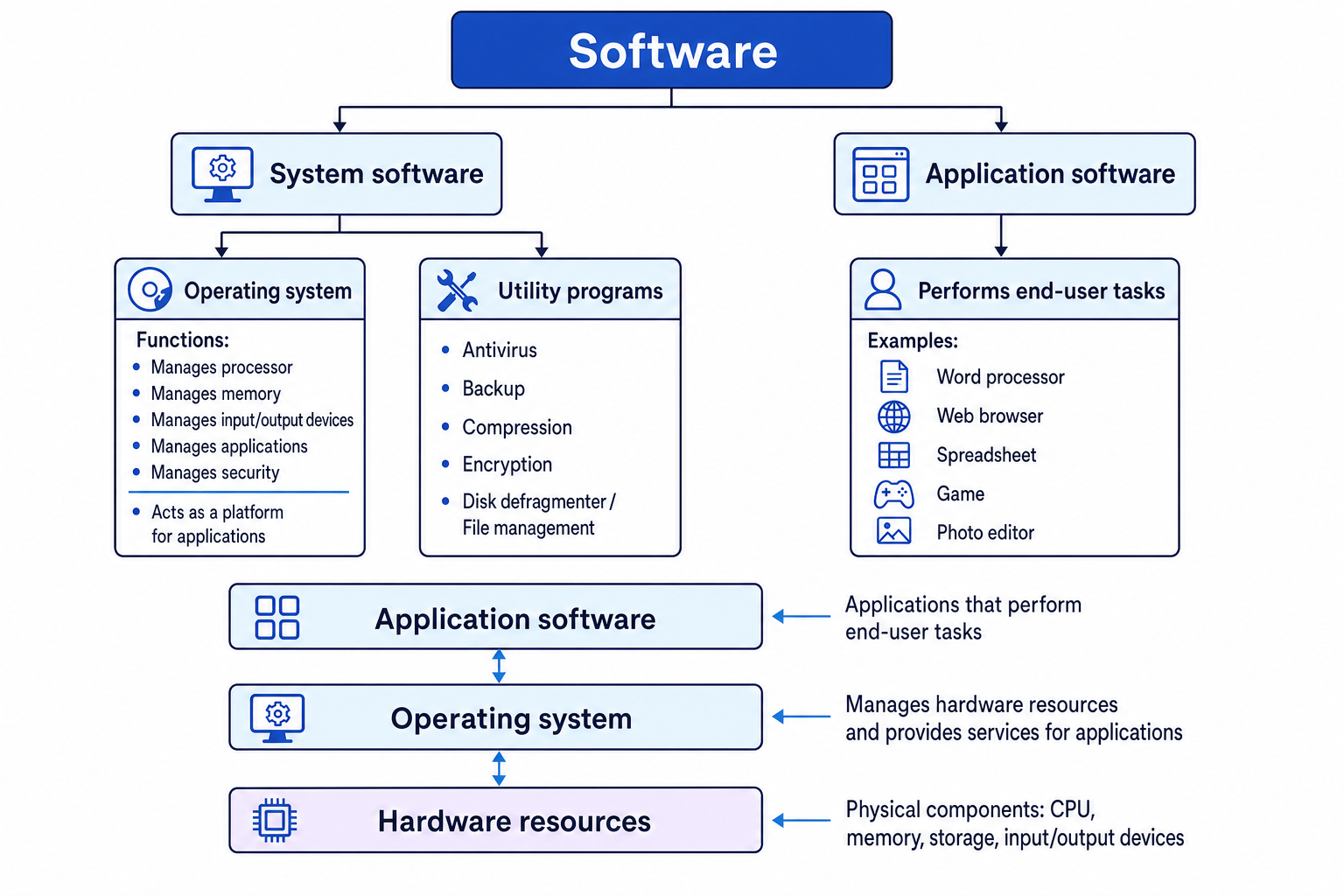
The diagram below shows the big picture: applications sit above the operating system, and the operating system manages the hardware resources underneath.
Key Idea
Main classification
System software helps run and manage the computer system. Application software helps the user carry out end-user tasks.
System software
Definition
System software
System software is software that manages the computer system’s resources and provides a platform for application software to run.
A resource is something the computer system needs to use, such as:
- processor time
- RAM
- storage
- input/output devices
- files
- network access
A platform is the environment that other software runs on. For example, Microsoft Word runs on Windows or macOS; a phone app runs on Android or iOS.
Examples of system software
Common examples include:
- operating systems, such as Windows, macOS, Linux, Android and iOS
- utility programs, such as antivirus software, backup tools and compression tools
System software usually works in the background, even if you sometimes interact with it directly.
Application software
Definition
Application software
Application software is software that performs end-user tasks.
An end user is the person using the computer system. An end-user task is a task the user actually wants to complete, such as writing a document, browsing the web, editing a photo or playing a game.
Examples of application software
Examples include:
- word processors
- web browsers
- spreadsheets
- presentation software
- database software
- email clients
- games
- photo or video editing software
Common Mistake
If you can open it, it is not always an application
Some system software has a window or icon you can open. For example, antivirus software may look like an app, but its main job is to protect and maintain the computer system, so it is a utility program, which is a type of system software.
Example
Classifying software from its job
A student uses three pieces of software: a photo editor, an antivirus program and Android on a phone.
- The photo editor lets the user change images. This is an end-user task, so it is application software.
- The antivirus program scans files and helps protect the computer system from malware. Its main job is maintenance and protection, so it is a utility program, which is system software.
- Android manages the phone’s hardware, runs apps and provides a platform for those apps. It is an operating system, which is system software.
Operating systems
Definition
Operating system
An operating system, often shortened to OS, is system software that manages the computer’s resources and provides a platform for applications to run.
Without an operating system, every application would have to manage the hardware itself. A word processor would need to know exactly how to communicate with the keyboard, screen, storage drive, printer and memory. That would make programs much harder to write and use.
Instead, the OS sits between the hardware and the applications. Applications ask the OS for services, such as saving a file, displaying text or using the network.
Key Idea
Why the OS is needed
The operating system makes the computer usable by managing hardware resources, running applications and controlling access to the system.
Main functions of an operating system
For this topic, focus on how the OS manages:
- processor or processors
- memory
- input/output devices
- applications
- security
Processor management
The processor, also called the CPU, carries out instructions. Many computers seem to run several programs at once, such as a browser, music player and messaging app.
The OS manages which program gets to use the processor and when. This is often called scheduling.
If a system has more than one processor or multiple cores, the OS can help divide work between them.
Memory management
Memory usually means RAM in this context. RAM stores the programs and data currently in use.
The OS decides:
- which programs are loaded into memory
- how much memory each program can use
- where in memory each program’s data is stored
- when memory can be freed up after a program closes
This helps stop one program accidentally overwriting another program’s data.
Input/output device management
Definition
Input/output device
An input/output device, often shortened to I/O device, is hardware used to get data into or out of a computer system.
Examples include:
- keyboard
- mouse
- touchscreen
- monitor
- printer
- speakers
- microphone
- storage drive
The OS manages communication with these devices. For example, when you press a key, the OS helps pass that input to the correct application. When you print a document, the OS helps send the data to the printer.
Application management
The OS manages applications by:
- loading them into memory
- starting them
- switching between them
- closing them
- handling errors if they stop responding
- giving them access to files, devices and network services
Applications rely on the OS to provide these common services.
Security management
The OS helps protect the computer system. It can manage:
- usernames and passwords
- user accounts
- file permissions
- access to devices
- software updates
- locking the screen
- controlling which programs are allowed to run
Security management is about controlling who and what can access the system.
Example
Matching OS functions to situations
A laptop is playing music, downloading a file, printing a document and asking the user to enter a password.
- Playing music while downloading requires the OS to share processor time between tasks. This is processor management.
- The downloaded data and the music player both need RAM while they are running. Deciding where that data is stored is memory management.
- Sending the document to the printer involves communication with an output device. This is input/output device management.
- Asking for a password before allowing access protects the system from unauthorised use. This is security management.
Utility programs
Definition
Utility program
A utility program is system software that helps maintain, manage, configure or protect a computer system.
Utilities are not usually used to create a document or complete a user task directly. Instead, they support the smooth running of the system.
Some utilities are built into the operating system. Others can be installed separately.
Common utility programs
| Utility program | Main purpose |
|---|---|
| Antivirus / anti-malware | Scans for, blocks or removes malicious software |
| Backup utility | Creates copies of files so they can be recovered later |
| Compression utility | Reduces file sizes to save storage space or make files quicker to transmit |
| Encryption utility | Scrambles data so it cannot be understood without the correct key or password |
| File management utility | Helps organise, move, rename, copy or delete files |
| Disk clean-up utility | Removes unnecessary files to free storage space |
| Disk defragmenter | Reorganises fragmented files on a magnetic hard disk drive |
Common Mistake
Disk defragmentation
Disk defragmentation is mainly relevant to magnetic hard disk drives. Solid-state drives do not need defragmenting in the same way.
Why utilities are needed
Even though the operating system manages the core running of the computer, extra maintenance tasks are still needed.
For example:
- backups help recover work after accidental deletion or hardware failure
- antivirus tools help reduce the risk of malware damage
- compression tools make large files easier to store or send
- encryption tools protect sensitive data if it is intercepted or stolen
Example
Choosing a suitable utility
A user has three problems: their folder is too large to email, they want to protect a confidential file, and they want to recover work if their laptop breaks.
- A folder that is too large to email needs its file size reduced. A compression utility is suitable.
- A confidential file should not be readable by unauthorised people. An encryption utility is suitable.
- Work needs to be recoverable if the laptop breaks. A backup utility is suitable.
Comparing system and application software
| Feature | System software | Application software |
|---|---|---|
| Main job | Runs, manages or protects the computer system | Performs tasks for the end user |
| Works with | Hardware resources and system services | User documents, media, web pages, data or games |
| Examples | Operating system, antivirus, backup utility | Word processor, web browser, spreadsheet, game |
| Needed before apps run? | Usually yes, especially the OS | Usually runs on top of the OS |
Tip
Quick test
Ask: “Is its main job to run or maintain the computer, or to help the user complete a task?” Run or maintain the system means system software. Complete a user task means application software.
Common Mistake
Do not classify by usefulness
Both system software and application software are useful. The difference is not whether the user likes it or whether it is important. The difference is the software’s main job.
Summary
Software is classified by what it does.
System software manages the computer system and provides a platform for applications. The most important example is the operating system, which manages processors, memory, input/output devices, applications and security. Utility programs are also system software because they maintain, manage or protect the system.
Application software performs end-user tasks, such as writing documents, browsing websites, editing images or playing games.
Exam technique
In the exam
- If asked to explain system software, mention both ideas: it manages computer resources and provides a platform for applications.
- If asked to classify software, base your answer on the software’s main purpose, not on whether the user can open it.
- For OS functions, connect your answer to the named resource: processor, memory, I/O devices, applications or security.
Self review
Check yourself
- What is the difference between system software and application software?
- Why does a computer need an operating system?
- Which utility would you choose for backup, compression and encryption tasks?

Recap questions
Test yourself with 5 quick questions on this guide. Answer them all correctly to complete it.
Computer systems
Guide 3 of 5
You've reached the end
Test yourself on this topic, or move on to the next guide.
How was this guide?