Revision notes for OCR AS Level Computer Science Research the problem. Open the guide for explanations and worked examples. Written against the OCR AS Level Computer Science specification, so the content matches what's examinable rather than general Computer Science background.
Research the problem
What you'll learn
- How to research a programming project problem using useful, relevant evidence.
- How to investigate similar solutions and use them to justify your own approach.
- How to describe the essential features of a computational solution.
- How to explain realistic limitations without making your project sound weak.
Why this section matters
In OCR H446, “Research the problem” sits inside the analysis of the problem part of the programming project. This is where you show that your project idea is not just something you personally fancy building: it responds to a real problem, real users, and realistic constraints.
Definition
Research
Research means collecting and analysing evidence so that your project decisions are informed, justified, and linked to the problem you are solving.
The key phrase is evidence to decision. You are not simply listing facts. You are using research to explain why your proposed solution should have particular features, use particular data, and avoid or include particular approaches.
Key Idea
The chain of justification
Strong analysis follows this chain: problem evidence → user needs → possible approaches → justified solution features → acknowledged limitations.
The diagram below shows the overall process.
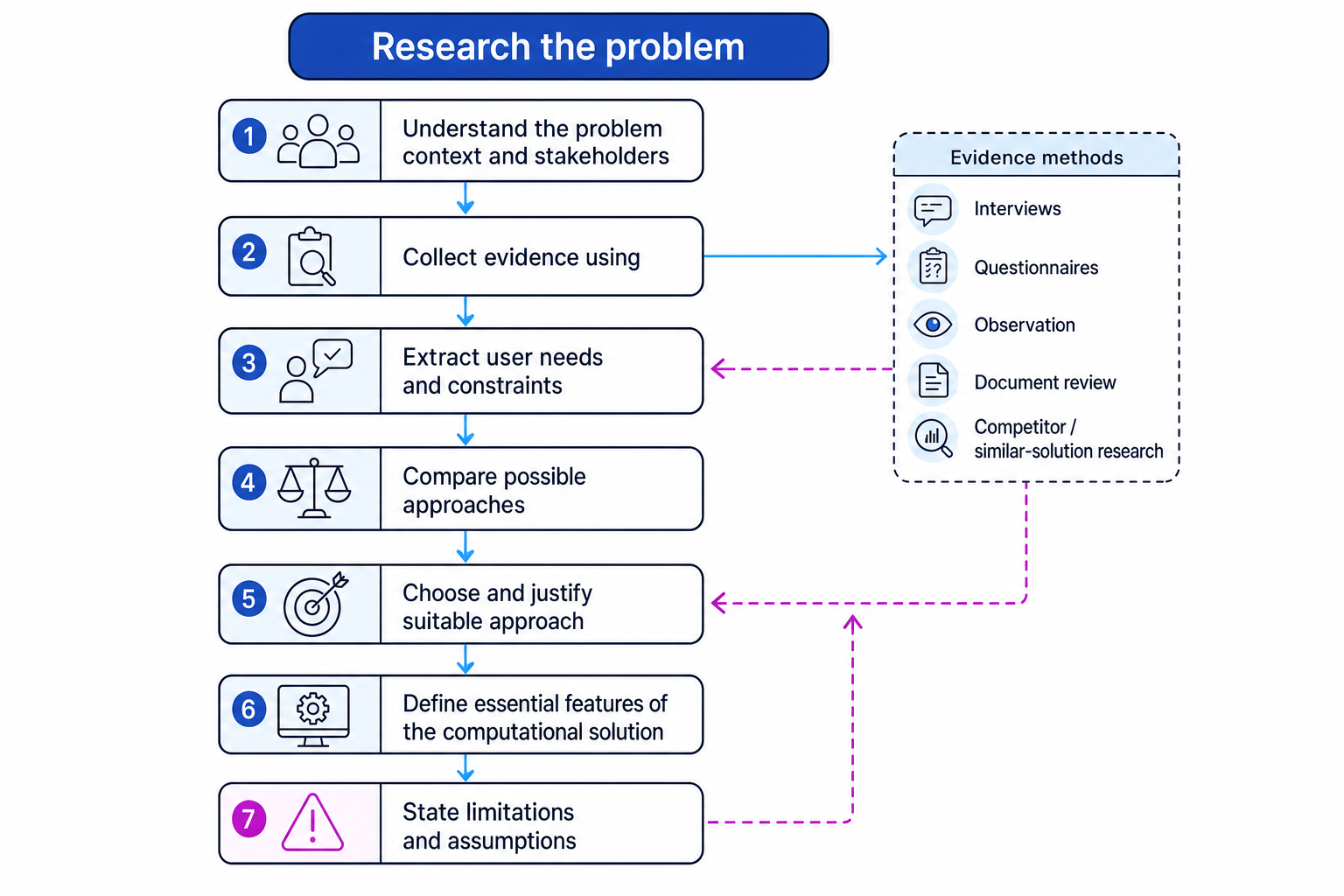
Start by understanding the problem context
The problem context is the real situation in which the problem exists. For example, a school library system is not just “a database of books”. The context includes librarians, students, borrowing rules, overdue books, damaged copies, school network restrictions, and the time staff actually have available.
Definition
Stakeholder
A stakeholder is a person or group affected by the problem or by the solution, such as users, managers, administrators, customers, or technical support staff.
You should identify stakeholders early because they help you decide what evidence to collect. Different stakeholders may want different things. A student might want quick searching; a librarian might need reliable stock control; a school may need data protection and access control.
Useful research methods
Common methods include:
| Method | What it is useful for |
|---|---|
| Interview | Detailed opinions, workflows, exceptions, and priorities |
| Questionnaire | Gathering views from many users quickly |
| Observation | Seeing what actually happens, not just what people say happens |
| Document review | Looking at existing forms, spreadsheets, policies, reports, or paper records |
| Similar-solution research | Learning from existing apps, websites, databases, or systems that solve related problems |
Definition
Primary and secondary research
Primary research is evidence you collect yourself, such as interviews or observations. Secondary research is evidence from existing sources, such as competitor systems, documentation, articles, or public datasets.
Example
Choosing suitable research methods
A student wants to build a booking system for a school music practice room.
- Identify the main stakeholders: students who book rooms, music teachers who supervise rooms, and office staff who may currently handle bookings.
- Match each stakeholder to a method: interview music teachers because they know the rules and exceptions; questionnaire students because many students may have different booking habits; review the existing paper booking sheet to find the data currently recorded.
- Decide what each method should reveal: the interview should identify constraints such as maximum booking length; the questionnaire should reveal whether students need mobile access; the document review should reveal fields such as date, time, room, student name, and instrument.
- Justify the method mix: using all three methods gives both detailed expert information and wider user feedback, so the proposed solution is less likely to miss an important requirement.
Common Mistake
Collecting evidence that does not affect the solution
Do not include research just to fill space. If a questionnaire answer, interview comment, or screenshot does not influence your requirements, approach, features, or limitations, it is probably weak evidence.
Research similar problems and similar solutions
A similar solution is an existing system that solves a related problem. It does not have to be identical to your project. For example, if you are building a school equipment loan system, you might research library systems, inventory systems, or booking systems.
When looking at similar solutions, focus on what you can learn:
- What features do they include?
- What data do they store?
- How do users search, filter, sort, add, edit, or delete records?
- What validation is used to prevent invalid input?
- How is security handled, such as logins or user roles?
- What is confusing, slow, missing, or unsuitable for your own context?
Definition
Approach
An approach is a broad way of solving the problem, such as a web application, desktop application, mobile app, spreadsheet-based tool, database-driven system, or game-like simulation.
The important skill is comparison. You should not simply say, “I looked at an app and liked the search bar.” Explain why a feature or approach is suitable for your own users and constraints.
Example
Comparing possible approaches
A student is planning a system for a sixth-form library. Research shows that students want to check availability quickly, librarians need accurate stock updates, and the school prefers systems that run on its internal network.
- Define criteria from the evidence: usability for students, data integrity for librarians, compatibility with the school network, and development risk within the project time.
- Compare three approaches: a spreadsheet, a desktop application with a local database, and a web application hosted internally.
- Apply weighted scores. If usability and data integrity are most important, give them higher weights. For example, a desktop database might score 4×3+5×3+4×2+3×2=414 \times 3 + 5 \times 3 + 4 \times 2 + 3 \times 2 = 414×3+5×3+4×2+3×2=41, while a spreadsheet might score 3×3+2×3+5×2+4×2=333 \times 3 + 2 \times 3 + 5 \times 2 + 4 \times 2 = 333×3+2×3+5×2+4×2=33.
- Make a justified choice: the desktop database is stronger because it supports reliable searching, updating, and validation, while still fitting the school network constraint.
- Acknowledge the trade-off: a web application might be more accessible, but it may introduce hosting and authentication complexity that is risky for the project timescale.
Tip
Use evidence words
Useful phrases include: “This suggests…”, “This supports…”, “Because users need…”, “Compared with…”, and “Therefore the proposed solution will…”. They help you link research to decisions.
Describe the essential features of the solution
An essential feature is something the solution must do, or must provide, for the project to solve the problem successfully. Essential does not mean “every possible nice idea”. It means the feature is necessary for the core problem.
Definition
Functional and non-functional requirements
A functional requirement describes what the system must do, such as adding a booking or searching for a book. A non-functional requirement describes how well the system must work, such as being secure, usable, reliable, or fast enough.
Good feature descriptions usually include:
- the feature itself;
- the user need or evidence behind it;
- the reason it is suitable;
- any important data, validation, or processing involved.
For example, “The system will allow a librarian to search books by title, author, or barcode because observation showed that staff currently waste time scanning long paper lists. This feature is essential because it directly reduces the time taken to locate a book record.”
That is much stronger than: “The system will have a search function.”
Typical essential features
Depending on your project, essential features might include:
- user login and role-based access;
- adding, editing, deleting, and searching records;
- validation of input data;
- calculations, scoring, recommendations, or automated decisions;
- reports, summaries, or charts;
- saving and loading persistent data;
- sorting, filtering, or querying data;
- a clear user interface suitable for the target users.
Example
Deriving features from research evidence
A student is creating a sports club attendance tracker. The teacher currently uses a paper register and later types totals into a spreadsheet.
- Convert the observed problem into a feature: because attendance is recorded twice, the system should allow attendance to be entered directly during the club session.
- Identify the data needed: each attendance record should store the student ID, club ID, date, and attendance status.
- Add validation: the system should prevent the same student being marked twice for the same club session, because duplicate marks would make attendance totals inaccurate.
- Add a reporting feature: the system should generate attendance summaries by student and by club, because the teacher currently spends time calculating totals manually.
- Explain why these features are essential: they address the main inefficiency found in the research, not just cosmetic improvements.
Common Mistake
Listing features without explaining choices
A bullet list of features is not enough. For analysis marks, explain why each important feature belongs in your solution and how research supports it.
Explain limitations of the proposed solution
A limitation is a boundary, weakness, or constraint of the proposed solution. It may be caused by time, available data, hardware, software, user access, security rules, or the project scope.
Definition
Limitation
A limitation is something the proposed solution will not do, cannot fully handle, or will only handle under certain assumptions.
Limitations are not the same as bugs. A bug is an error in implementation. A limitation is a known restriction you can explain during analysis.
Strong limitations are specific. They also explain the effect on the user or the solution.
Weak limitation: “The system might not be perfect.”
Strong limitation: “The system will record equipment loans within one school department only. It will not synchronise with the school’s central asset database, so staff will still need to update that database separately.”
Types of limitation
You might discuss:
- Scope limitations: what is deliberately excluded, such as online payments or multi-school support.
- Technical limitations: hardware, network access, software libraries, or hosting constraints.
- Data limitations: incomplete historical data, small training data, or data entered manually.
- User limitations: not all users may have accounts, devices, or internet access.
- Security and legal limitations: for example, if personal data is stored, the solution must consider The Data Protection Act 1998.
- Performance limitations: the system may be suitable for a school club but not for thousands of simultaneous users.
Example
Writing useful limitations
A student proposes an appointment booking system for a small hair salon.
- Identify the project boundary: the system will manage appointments for one salon, not a chain of salons.
- Explain the consequence: it will not support staff working across multiple branches, so it would need redesign before being used by a larger business.
- Identify a data limitation: customer details are entered manually, so the accuracy of phone numbers and email addresses depends on staff input.
- Explain the mitigation: validation can check format, but it cannot guarantee that the customer has given a real phone number.
- Connect back to suitability: despite these limitations, the solution is still appropriate because the researched client only needs a single-site appointment system.
Common Mistake
Do not undermine your own project
Avoid writing limitations that make the project sound pointless, such as “the solution may not work” or “users probably will not use it”. State realistic boundaries, then explain why the solution is still suitable within those boundaries.
What your write-up should show
By the end of this section, a reader should be able to see:
- what problem you investigated;
- who the stakeholders are;
- what research methods you used and why;
- what similar solutions taught you;
- which approach you selected and why;
- which features are essential to the computational solution;
- what the solution will not cover, and why those limitations are acceptable.
The best write-ups feel like a trail of evidence. Every major design choice should be traceable back to research.
Exam technique
In the exam
- Link every proposed feature to a researched user need or problem; do not leave the examiner guessing why it matters.
- When comparing approaches, discuss trade-offs such as usability, data integrity, security, complexity, and development time.
- State limitations as controlled boundaries of the proposed solution, not as vague apologies or possible implementation failures.
Self review
Check yourself
- Can you explain the difference between researching a problem and simply describing a project idea?
- Have you compared at least one alternative approach or similar solution before justifying your choice?
- Can each essential feature in your proposed solution be traced back to evidence from your research?

Keep learning
Make a free account to read the full revision notes and worked examples.