Revision notes for AQA A Level Computer Science Structured Query Language (SQL). Open the guide for explanations and worked examples. Written against the AQA A Level Computer Science specification, so the content matches what's examinable rather than general Computer Science background.
Structured Query Language (SQL)
What you'll learn
- How SQL is used to define tables in a relational database.
- How to retrieve data using
SELECT, including from multiple related tables. - How to insert, update and delete records safely.
- How to avoid common exam mistakes with keys, joins and
WHEREclauses.
The database ideas SQL relies on
Before writing SQL, you need the relational database vocabulary.
A relational database stores data in tables. A table is made up of records and fields.
Definition
Table, record and field
A table stores data about one type of thing. A record is one row in a table. A field is one column in a table, storing one attribute of each record.
For example:
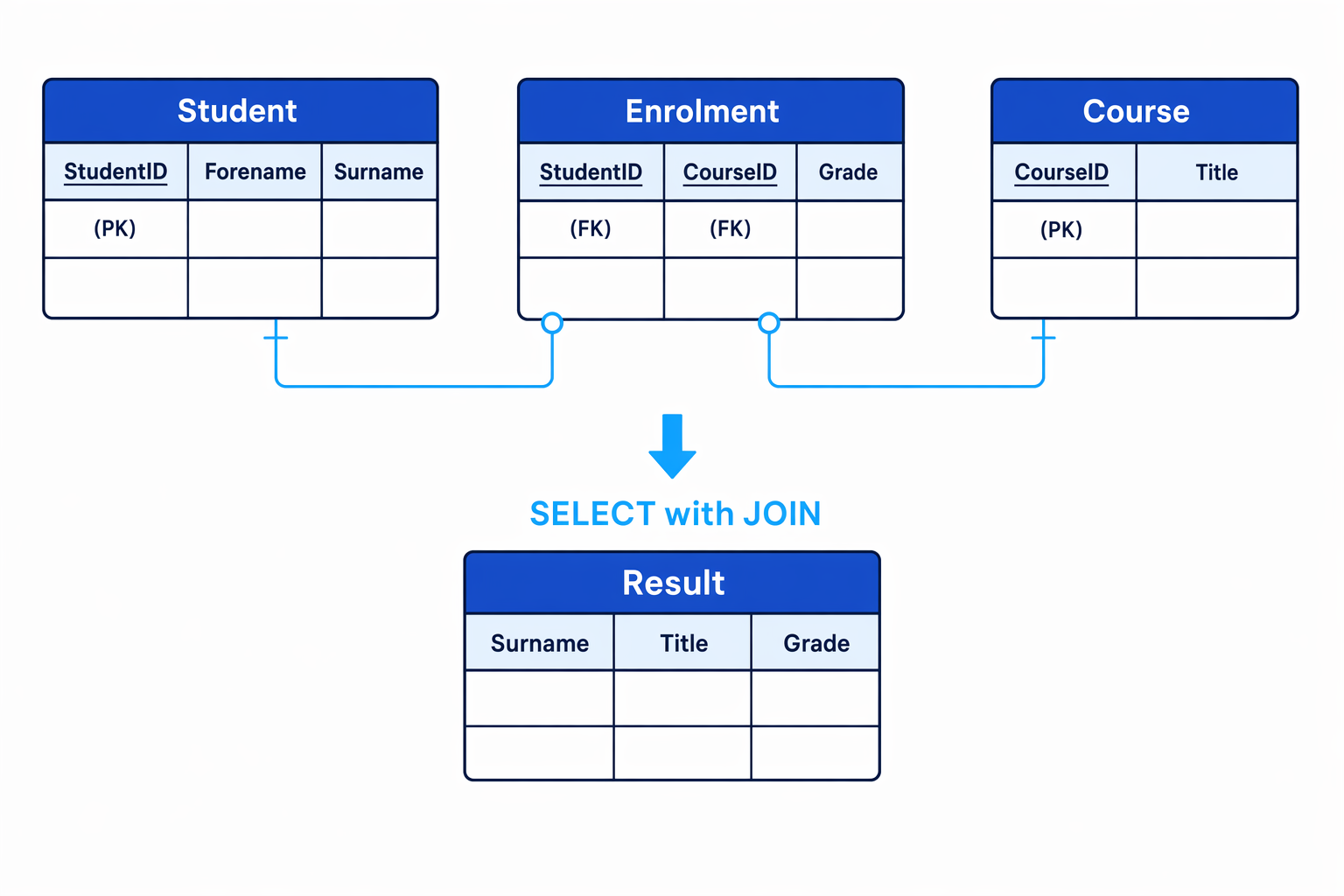
Student(StudentID, Forename, Surname)Course(CourseID, Title)Enrolment(StudentID,CourseID, Grade)
The bold attributes are the entity-identifier attributes: they identify a record uniquely.
Definition
Primary key and foreign key
A primary key is a field, or combination of fields, that uniquely identifies each record in a table. A foreign key is a field in one table that refers to the primary key of another table.
In the example, Enrolment.StudentID refers to Student.StudentID, and Enrolment.CourseID refers to Course.CourseID.
This is what allows SQL to combine data from several tables.
Key Idea
Why keys matter in SQL
You normally store each fact once, then use primary keys and foreign keys to link related records. SQL joins use these key relationships to rebuild useful information when you query the database.
What SQL is
Definition
SQL
Structured Query Language (SQL) is a declarative language used to define database tables and to retrieve, insert, update and delete data in a relational database.
Declarative means you describe what result you want, rather than giving a step-by-step algorithm for how the database management system should find it.
SQL keywords are conventionally written in uppercase, such as SELECT, FROM, WHERE and CREATE TABLE. Table and field names are usually written in a consistent style chosen by the database designer.
Defining a database table
SQL can be used as a data definition language, meaning it can define the structure of the database.
The main command you need here is CREATE TABLE.
A table definition usually states:
- the table name
- each field name
- each field’s data type
- key constraints, such as
PRIMARY KEYandFOREIGN KEY - other constraints, such as
NOT NULLorUNIQUE
Common data types include:
| Data type | Typical use |
|---|---|
INTEGER | Whole numbers, such as an ID |
VARCHAR(n) | Text up to n characters |
CHAR(n) | Fixed-length text |
DATE | A calendar date |
BOOLEAN | True/false values, where supported |
DECIMAL(p, s) | Exact decimal values, such as money |
A table definition for Student could be:
CREATE TABLE Student (
    StudentID INTEGER PRIMARY KEY,
    Forename VARCHAR(30) NOT NULL,
    Surname VARCHAR(30) NOT NULL
);
A linking table such as Enrolment can have a composite primary key, where two fields together identify a record:
CREATE TABLE Enrolment (
    StudentID INTEGER,
    CourseID INTEGER,
    Grade VARCHAR(2),
    PRIMARY KEY (StudentID, CourseID),
    FOREIGN KEY (StudentID) REFERENCES Student(StudentID),
    FOREIGN KEY (CourseID) REFERENCES Course(CourseID)
);
Example
Defining a linking table
Suppose a student can take many courses, and a course can have many students. You need a table to store each student-course enrolment.
-
Choose the table’s purpose: one record should represent one student enrolled on one course, so the table is called
Enrolment. -
Choose the fields needed to identify that record:
StudentIDidentifies the student andCourseIDidentifies the course. -
Decide the primary key: neither
StudentIDnorCourseIDis unique on its own, but the pairStudentID, CourseIDshould be unique, so usePRIMARY KEY (StudentID, CourseID). -
Add foreign keys to preserve referential integrity:
StudentIDmust refer to an existing student, andCourseIDmust refer to an existing course. -
Add any extra data about the relationship itself:
Gradebelongs inEnrolment, because the grade is for a student on a particular course.
Common Mistake
Putting repeated data in the wrong table
Do not put a list of course titles inside the Student table. That creates repeated groups and makes updates unreliable. Use a separate linking table such as Enrolment.
Retrieving data with SELECT
SQL retrieves data using SELECT.
The basic pattern is:
SELECT field1, field2
FROM TableName
WHERE condition;
SELECTsays which fields to output.FROMsays which table to use.WHEREfilters records so only matching rows are returned.
For example:
SELECT Forename, Surname
FROM Student
WHERE StudentID = 104;
This retrieves the forename and surname of the student whose StudentID is 104.
You can also sort results:
SELECT Forename, Surname
FROM Student
ORDER BY Surname ASC;
ASC means ascending order. DESC means descending order.
Conditions in WHERE
A WHERE condition can use comparison operators such as:
| Operator | Meaning |
|---|---|
= | Equal to |
<> | Not equal to |
< | Less than |
> | Greater than |
<= | Less than or equal to |
>= | Greater than or equal to |
You can combine conditions using AND, OR and NOT.
For text pattern matching, SQL often uses LIKE:
SELECT Forename, Surname
FROM Student
WHERE Surname LIKE 'Patel%';
This retrieves students whose surname starts with Patel.
Tip
Quoting values
Text values and dates are normally written in single quotes, such as 'Ada' or '2026-09-01'. Numeric values are not normally quoted, such as StudentID = 104.
Retrieving data from multiple tables
To retrieve related data from multiple tables, use a JOIN.
The most common join for A-Level questions is an INNER JOIN, which returns only records where the join condition matches in both tables.
SELECT Student.Surname, Course.Title, Enrolment.Grade
FROM Student
INNER JOIN Enrolment
    ON Student.StudentID = Enrolment.StudentID
INNER JOIN Course
    ON Enrolment.CourseID = Course.CourseID
WHERE Course.Title = 'Computer Science';
The dot notation TableName.FieldName makes it clear which table a field comes from.
Example
Writing a join query
Write a query to show each student’s surname, course title and grade for students taking Computer Science.
-
Identify the output fields: the result needs
Student.Surname,Course.TitleandEnrolment.Grade. -
Identify the tables needed:
Surnameis inStudent,Titleis inCourse, andGradeis inEnrolment, so all three tables are required. -
Join
StudenttoEnrolmentusing the matching key fields:Student.StudentID = Enrolment.StudentID. -
Join
EnrolmenttoCourseusing the matching key fields:Enrolment.CourseID = Course.CourseID. -
Apply the filter to keep only Computer Science records:
WHERE Course.Title = 'Computer Science'.
Common Mistake
Forgetting the join condition
If you list multiple tables but forget the correct join condition, the database may combine every row from one table with every row from another. This is called a Cartesian product and usually gives far too many results.
Inserting data
SQL uses INSERT INTO to add new records.
The safest form names the fields explicitly:
INSERT INTO Student (StudentID, Forename, Surname)
VALUES (105, 'Grace', 'Hopper');
When inserting related data, insert the parent record before the child record. For example, the student and course must exist before you insert an enrolment that refers to them.
INSERT INTO Enrolment (StudentID, CourseID, Grade)
VALUES (105, 12, 'A');
Key Idea
Referential integrity
A foreign key value should match an existing primary key value in the referenced table. This prevents records such as an enrolment for a student who does not exist.
Updating data
SQL uses UPDATE to change existing records.
UPDATE Enrolment
SET Grade = 'A'
WHERE StudentID = 105
  AND CourseID = 12;
This changes only the grade for student 105 on course 12.
Example
Updating the correct record
Suppose Grace Hopper’s grade for course 12 must change to A.
-
Choose the table that stores the value being changed: grades are stored in
Enrolment, not inStudentorCourse. -
Set the new value using
SET Grade = 'A'. -
Use the composite key fields to identify exactly one enrolment:
StudentID = 105 AND CourseID = 12.
Common Mistake
UPDATE without WHERE
An UPDATE statement without a WHERE clause updates every record in the table. In an exam, always check which record or records should be changed before writing the condition.
Deleting data
SQL uses DELETE FROM to remove records.
DELETE FROM Enrolment
WHERE StudentID = 105
  AND CourseID = 12;
This removes Grace Hopper’s enrolment on course 12, but does not delete the student or the course.
Common Mistake
Deleting a field instead of a record
DELETE FROM removes whole records. If you want to remove or change the value in one field, use UPDATE, for example SET Grade = NULL.
When tables are linked by foreign keys, the order of deletion matters. You usually delete child records first. For example, delete a student’s enrolments before deleting the student record itself, unless the database has been set up to cascade deletions.
SQL command summary
| Purpose | SQL command | Typical pattern |
|---|---|---|
| Define a table | CREATE TABLE | CREATE TABLE TableName (...) |
| Retrieve data | SELECT | SELECT fields FROM table WHERE condition |
| Add a record | INSERT INTO | INSERT INTO table (fields) VALUES (values) |
| Change records | UPDATE | UPDATE table SET field = value WHERE condition |
| Remove records | DELETE FROM | DELETE FROM table WHERE condition |
Exam technique
In the exam
-
Identify the table that actually contains the data being selected, inserted, updated or deleted.
-
For multi-table retrieval, join tables using primary key to foreign key matches, and qualify field names when there could be ambiguity.
-
For
UPDATEandDELETE, include a preciseWHEREclause unless the question clearly says every record should be affected.
Self review
Check yourself
- Why is
Enrolment(StudentID, CourseID, Grade)better than storing several course titles in theStudenttable? - What is the difference between
WHEREandONin a join query? - What could go wrong if you wrote
DELETE FROM Student;with noWHEREclause?